How to use Addrevenue links with Google Ads
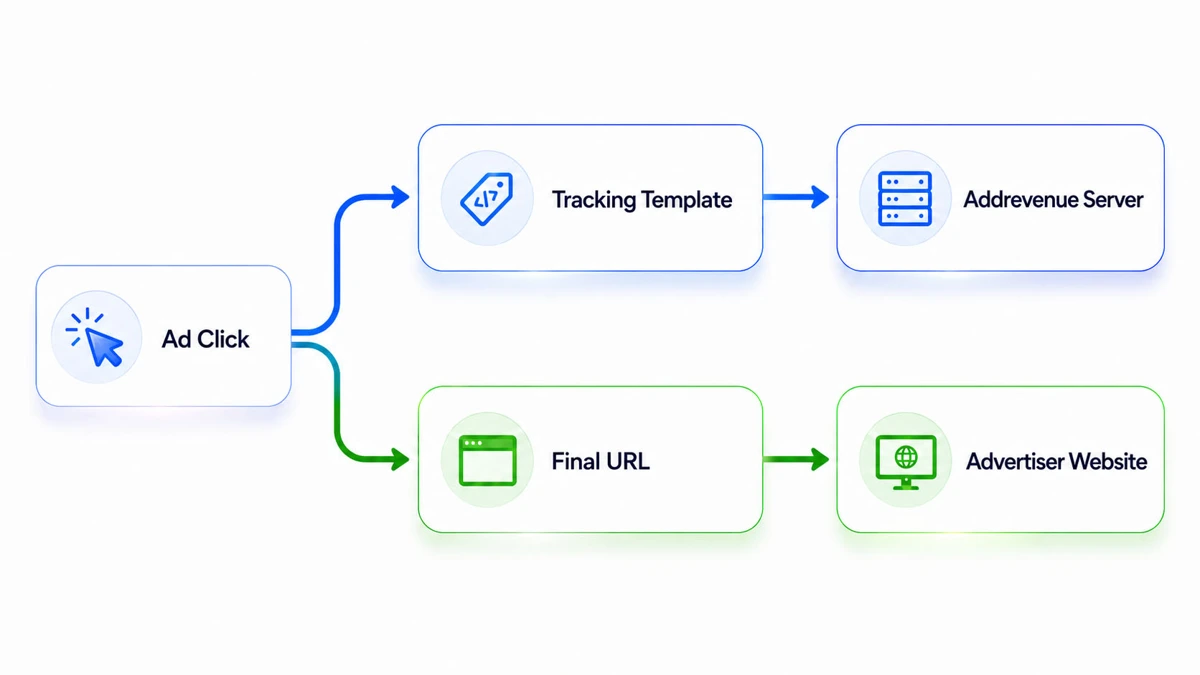
Google Parallel Tracking means that the user is sent directly to the final destination, while Addrevenue's click tracking is called separately in the background. For this to work, the Addrevenue link must be added to the Tracking template field in Google Ads and supplemented with the parameter u={lpurl}Google Parallel Tracking is Google's model for handling click tracking without delaying the visitor's path to the landing page. Instead of first sending the user via a tracking link and then on to the advertiser, two things happen in parallel:
- The visitor is sent directly to the advertiser's landing page.
- Google calls the tracking link in the background so that the click can be registered.
Google Parallel Tracking can be used in Search, Shopping, Display, Video and Performance Max, among others.
How to set up the Addrevenue link
When using an Addrevenue link in Google Ads, it should be placed in the Tracking template field, not as the ad's Final URL.
Use your regular Addrevenue link and add to:
u={lpurl}
Example:
https://addrevenue.io/t?a={advertiserId}&c={channelId}&u={lpurl}
- You should replace {advertiserId} with the advertiser's actual Advertiser ID from Addrevenue.
- You should replace {channelId} with your own actual Channel ID from Addrevenue.
- {lpurl} is Google's ValueTrack parameter for the ad's landing page, and it is set automatically.
Google describes the Tracking template as the place where tracking information should be entered, while the Final URL should be the actual page the user should land on.
What does the "u" parameter do?
Addrevenue uses the u parameter as a transparency parameter for Google Ads compatible click tracking. Google requires that certified third-party click trackers use a working transparency parameter that shows where the traffic is intended to go.
Example of a correct setup:
Tracking template
https://addrevenue.io/t?a=983123&c=3441234&u={lpurl}
Final URL
https://www.annonsor.se/produkt
This means that:
- the user lands directly on https://www.annonsor.se/produkt
- Addrevenue receives the click call in the background
- The tracking works together with Google Parallel Tracking
Important!
Do not put the Addrevenue link as the Final URL in Google Ads. It should be in the Tracking template.
When this is set up correctly, you can use Addrevenue's affiliate tracking in Google Ads in a way that is adapted to Google's current click flow.
Create affiliate account
I have a channel with many followers and want to earn money by marketing exciting advertisers and their products.By submitting I accept addrevenue.io's terms of use and privacy policy.
This site is protected by reCAPTCHA and the Google Privacy Policy and Terms of Service apply.